 Mode: Turbo 25W+
 Silent
 Balanced
 Turbo
Turbo Fans + Power
 GPU Mode: iGPU + dGPU
 Eco
Eco Standard
 Ultimate
 Optimized
 Screen: 120Hz + Overdrive
 Flicker-free Dimming / Visual Mode
 Slash Lighting
 Laptop Keyboard +
FN-Lock
Laptop Keyboard +
FN-Lock Extra
ExtraThe control app every laptop should come with. G-Helper (also written as GHelper or G Helper) is fast, native, and straight to the point - a tool for tuning performance, fans, GPU, battery, and RGB on any Asus laptop or handheld: ROG Zephyrus, Flow, Strix, Scar, TUF, Vivobook, Zenbook, ProArt, ROG Ally, and beyond.

- Seamless and automatic GPU switching
- All performance modes can be fully customized with power limits and fan curves
- Lightweight. Doesn't install anything on your system. Just a single exe to run
- Simple and clean native UI with easy access to all settings
- FN-Lock and custom hotkeys
Performance modes
Silent · Balanced · Turbo, with default fan curves built in.
GPU modes
Eco · Standard · Ultimate · Optimized - switch on demand.
Refresh rate
Screen refresh rate control with display overdrive.
Fan curve editor
Custom curves, power limits and turbo boost per mode.
Anime Matrix & Slash
Animated GIFs, clock, audio visualizer on the LED panel.
RGB backlight
Animation modes and colors for the keyboard.
Hotkey handling
Remap M-keys and the ROG/Aura keys to anything.
Live monitoring
CPU/GPU temperature, fan speeds and battery status.
Hardware overlay
FPS, temps, fan speed and power on top of your games.
Battery charge limit
Cap charge to preserve long-term battery health.
NVIDIA tuning
GPU overclocking and undervolting controls.
XG Mobile
Control the external XG Mobile GPU dock.
AMD undervolting
CPU undervolting and per-mode temperature limits.
BIOS & drivers
Check for and install BIOS and driver updates.
Asus mice
Buttons, DPI, polling rate and lighting of ROG and TUF mice.
Asus keyboards
Per-key RGB, bindings and battery of external keyboards.
Asus headsets
Lighting, equalizer, microphone and battery of ROG headsets.
Flicker-free dimming
Visual modes and pulse-free brightness control.

All modes are baked into BIOS along with default fan curves and power limits. They're the same thing you'd find in Armoury Crate.
Each default BIOS mode is paired with a matching Windows Power Mode. You can adjust this under Fans + Power.
- Silent in BIOS + Best power efficiency power mode
- Balanced (Performance on AC) in BIOS + Balanced power mode
- Turbo in BIOS + Best performance power mode

- Eco - only the low-power integrated GPU is enabled; iGPU drives the built-in display
- Standard (MS Hybrid) - iGPU and dGPU enabled; iGPU drives the built-in display
- Ultimate - iGPU and dGPU enabled; dGPU drives the built-in display (supported on 2022+ models)
- Optimized - disables the dGPU on battery (Eco) and enables it when plugged in (Standard)
GPU Tweaking
In each mode the dedicated GPU can be tuned to your needs - Core and Memory clock offsets, GPU power, Dynamic Boost, and a Temperature Limit.

- Performance mode switching when on battery or plugged in
- Optimized GPU mode - disables dGPU on battery, enables when plugged in
- Auto screen refresh rate (60Hz on battery, max Hz when plugged in)
- Keyboard backlight timeout on battery or when plugged in
Driver Updates
G-Helper includes an automatic BIOS and driver update checker that pulls directly from the official Asus website for your specific model, highlighting new downloads as they become available. All links in the Updates section point to official Asus downloads.

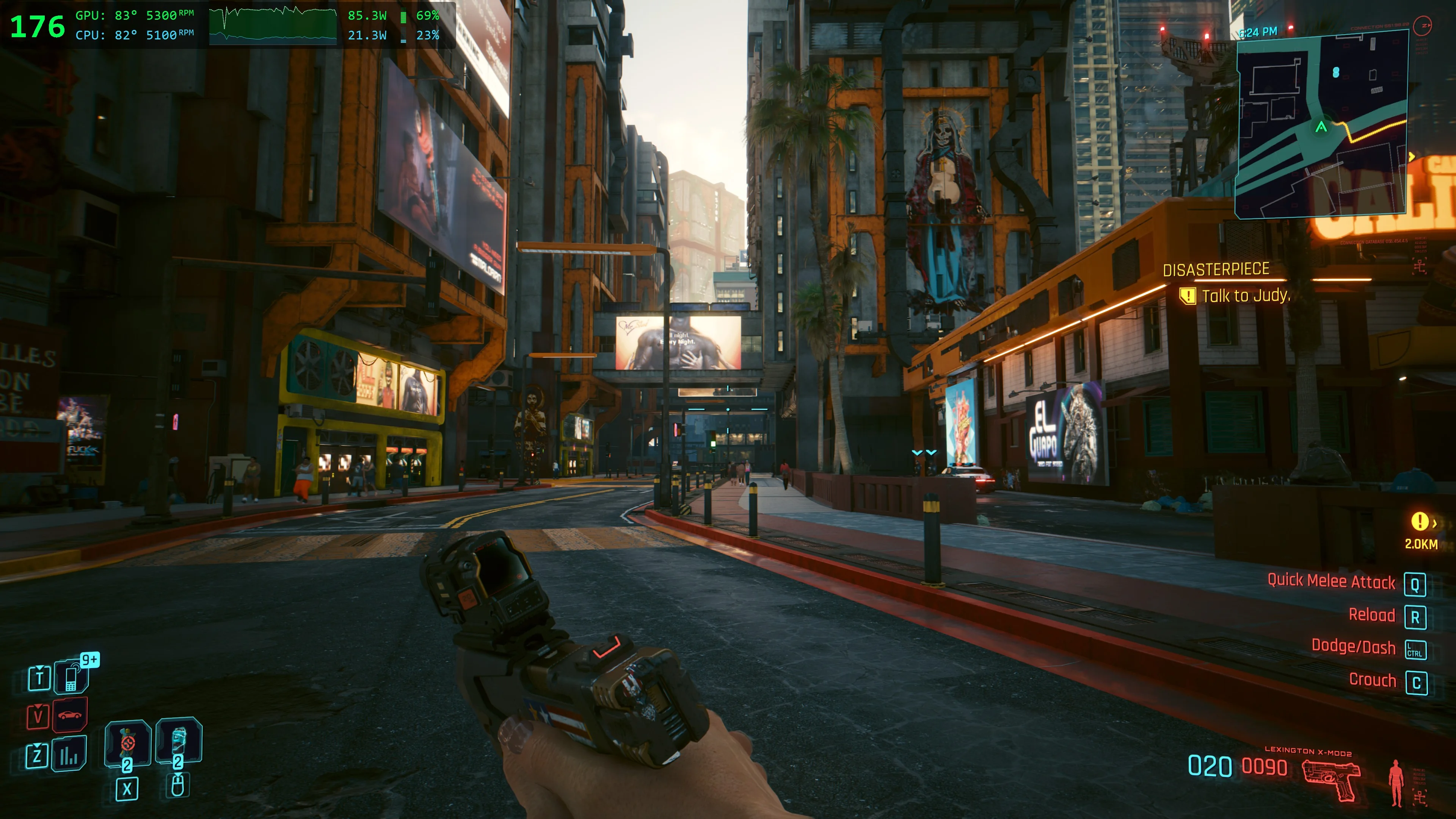
G-Helper draws a small overlay over your game with FPS, temperatures, fan RPM and power draw, so there's no separate monitoring tool to run alongside it. The FPS counter follows whichever game is in focus, and the dedicated-GPU readings drop out on their own once it powers down.
- FPS of the active game, on DirectX 10/11/12 and Vulkan
- CPU and GPU temperature, fan RPM and power draw
- A rolling 60-second chart of CPU and GPU power
- Load bars you can fold away to keep it as compact as you want
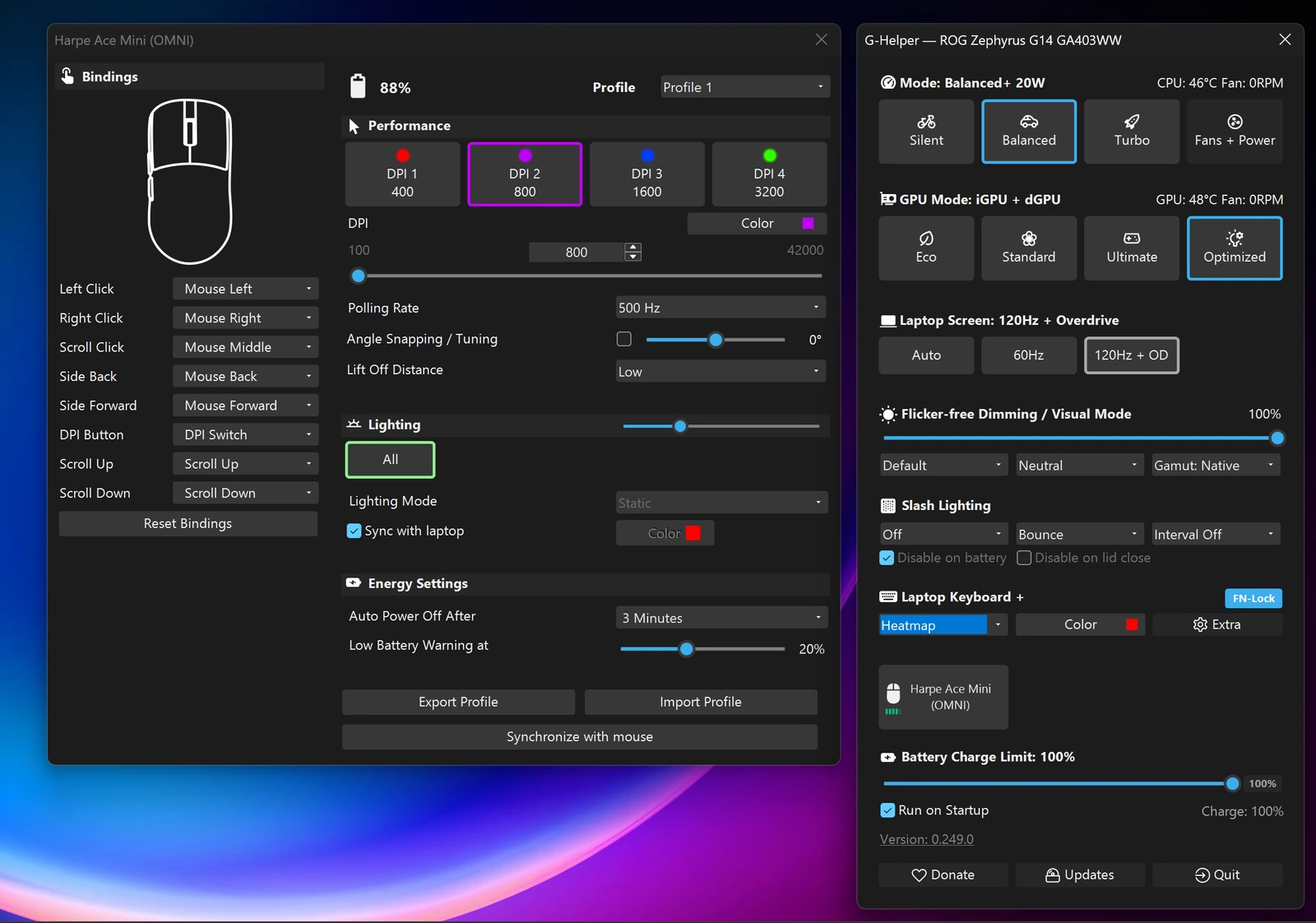
Connect a supported Asus mouse and a button with its name appears in the main window. Button bindings, DPI profiles, polling rate, lighting and battery settings - no Armoury Crate needed.
Everything is written to the mouse's onboard memory, so your setup stays with the mouse even when G-Helper isn't running.
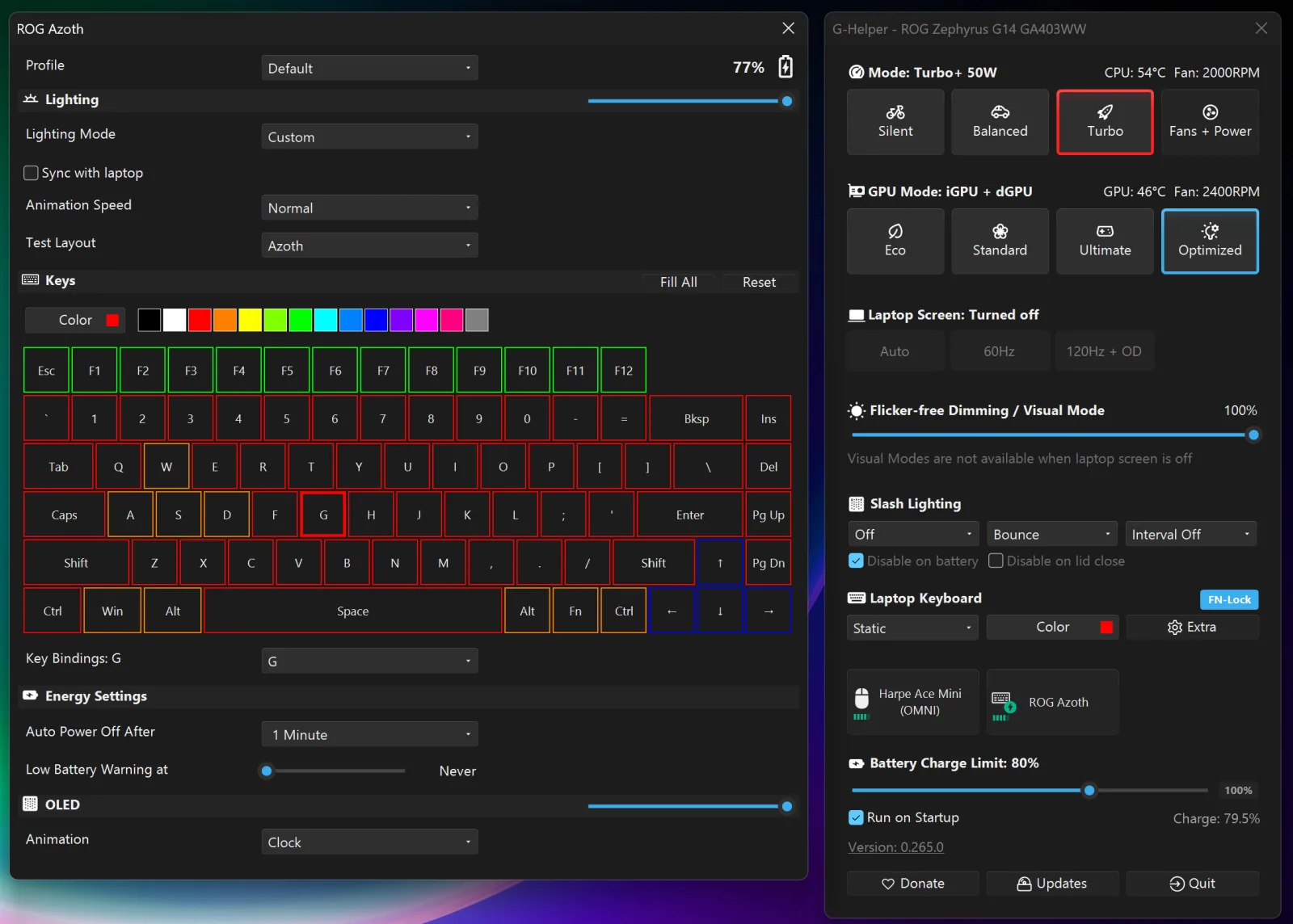
External Asus keyboards: color every key, remap keys, the screen and the battery, from the same window. The keyboard can also follow your laptop's lighting.
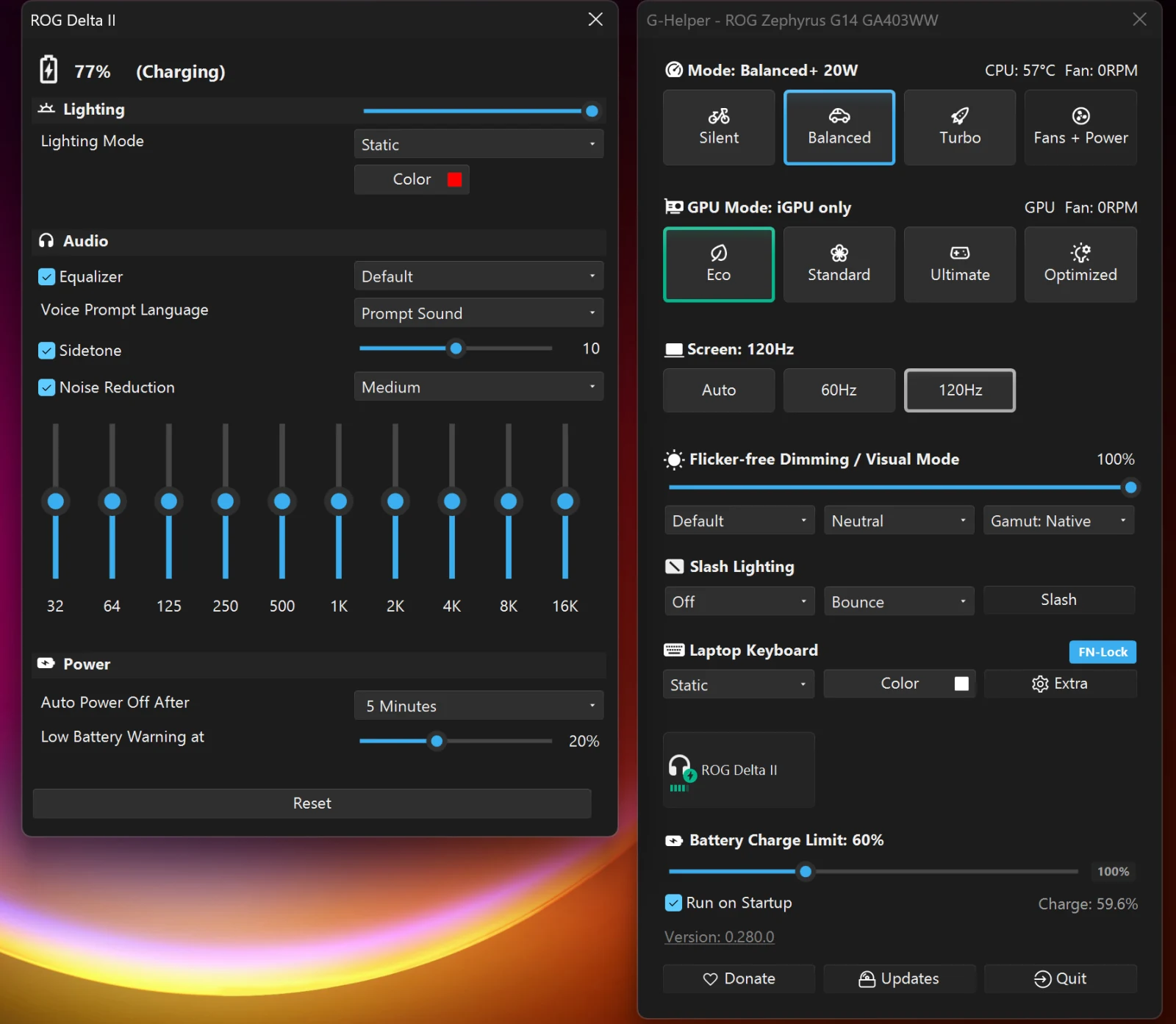
Asus headsets: lighting, equalizer presets, microphone and battery, from the same window.
G-Helper is not an operating system, firmware, or a driver. It does not "run" your hardware in real time.
It's an app that lets you select one of the predefined operating modes created by the manufacturer (and stored in BIOS) and optionally adjust settings that already exist on your device - the same ones Armoury Crate exposes. It does this through the Asus System Control Interface driver that Armoury uses.
If you use the equivalent mode and settings you'd use in Armoury Crate, the performance and behavior of your device won't be different.
The role of G-Helper for your laptop is similar to the role of a remote control for your TV.



From the community
Notes people have sent in. Thank you all.
Love your software - it has fixed my Asus laptop which I was constantly hating, and now I can fully enjoy it. Asus should be paying you!
Thank you so much for this incredible piece of software, it solved all my problems with my new Asus laptop.
Thank you for making my very expensive laptop usable. As a University Student I thank you - you've made my compilations quicker, my games run faster, and my battery last longer.
Amazing! Saved my brand-new Asus G16 $2800 laptop from getting returned.
Thanks for all your hard work! This program alone informed my decision to buy an Asus laptop over the other brands. You're an absolute lifesaver.
Your hard work helps people gain control over their lives. Thank you!
When one person can create a better solution than a whole company…
Thank you for your initiative! G-Helper has been a life changer for me.
Thank you for all your work on G-Helper - it makes my Scar so much better!
Thank you very much for developing G-Helper! It improved a LOT the performance and FPS of my G16 2024.
Thank you for the development of G-Helper. It's a great program - I've completely replaced Asus Armoury Crate with it.
Thank you for developing this utility - really appreciate not having to use Asus bloatware to control my laptop, and the fan control for older TUF Laptops is the cherry on top.
So much better than Armoury Crate. Keep it up!
Thanks for your work on this app - been a godsend, as I'm a Mac guy. Really helps!
Thank you so much for what you do for the community. Exceptional piece of software!
Absolutely top-notch work! I use the app and promote it everywhere. You are a lifesaver!
I really appreciate G-Helper. I'm not sure I would have kept my Asus laptop if it wasn't available.
Thank you for this awesome tool - it lets me quickly change modes and play multiple games without worrying about performance or burnout.
Thank you for transforming my Zenbook S16 from a problematic, loud-or-slow machine into a performant and quiet one.
Thank you so much for this amazing piece of software. I couldn't use my ASUS laptop without it.
Very light on resources and absolutely clutter-free. I'm getting very good battery life on my Zephyrus G14.
Using G-Helper to keep CPU temps low on a Ryzen 9 TUF A16 - wattage limits, undervolt, target temp. Excellent.
I felt obligated to pay for software that quite literally transforms multi-thousand-dollar laptops.
G-Helper has been a game-changer for my 2024 G14 Zephyrus!
Thank you for single-handedly making software that a massive company can't with a team of engineers. Absolute legend.
You've made my laptop usable again. Thank you.
Thanks for breathing life back into my beloved 2020 G14!
Without G-Helper, nobody should use an Asus notebook. Works perfectly with my ProArt P16 5090.
Muchas gracias, le dio nueva vida a mi laptop vieja. Saludos desde Perú.
Been wanting to thank you for this amazing project for a while - what a great alternative to Asus's nightmarish software!
Thanks for the great tool. I appreciate the work you put into it.
A real game-changer for my Asus ROG Zephyrus G14. Keep up the good work!
You've made my Asus ROG Strix G614FR a powerful beast!
Thank you for this software - my Zephyrus G14 is cold now XD
I have been using your software and it's been nothing short of a blessing.
Thank you for your dedication to keeping this project going. A fantastic alternative to AC, which was giving me all sorts of issues.
Just wanted to drop a quick thank you for G-Helper. It's genuinely one of the best pieces of software I've used on a laptop - and a great way to avoid the Armoury Crate bloatware.
Just want to say thank you for this app. It gives you full control, max performance and smooth software running. Keep up the good work!
Thank you for your hard work on such an awesome piece of software!
Thanks for the great app! I can now ditch Armoury Crate with the new resource monitor you added! :)
Love the new overlay! Keep up the good work!
Good Job mit dem GHelper!
Thank you for creating this wonderful software!
Great addition to my new computer, thanks!
I love G-Helper and I am a proud supporter! It works awesome with my ROG Zephyrus G14.
Really like the work you do to make my laptop experience so much more relaxed. Keep up the good work!
Best ASUS and ROG util ever! Deeply appreciated!
It's a breath of fresh air to have clean, unobtrusive control over my laptop. I really appreciate all the time and effort you've dedicated to make this a must-have for Asus laptop owners.
Thank you for all the time and effort you put into the project - it has made using my ASUS laptop much better.
You are doing an amazing job! I discovered your app months ago - a pity I didn't know about it years ago. This is one of the best apps I have!
Congratulations on the G-Helper project! I just donated the turbo contribution, hope it helps.
I love the tool!
Thanks for building G-Helper!
Thank you for the great value you provide with G-Helper!
Code Signing Policy
Free code signing provided by SignPath.io, certificate by SignPath Foundation.
Disclaimers
"Asus", "ROG", "TUF", and "Armoury Crate" are trademarks of AsusTek Computer, Inc. We make no claims to these or any assets belonging to AsusTek Computer and use them purely for informational purposes.
THE SOFTWARE IS PROVIDED "AS IS" AND WITHOUT WARRANTY OF ANY KIND, EXPRESS OR IMPLIED, INCLUDING BUT NOT LIMITED TO THE WARRANTIES OF MERCHANTABILITY, FITNESS FOR A PARTICULAR PURPOSE AND NON-INFRINGEMENT. MISUSE OF THIS SOFTWARE COULD CAUSE SYSTEM INSTABILITY OR MALFUNCTION.